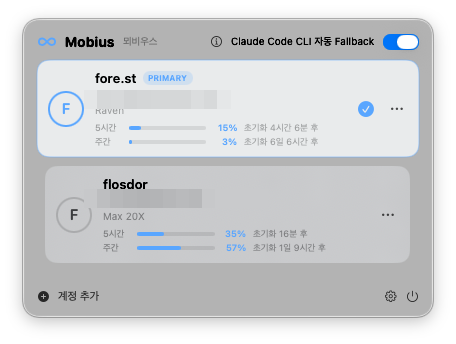
Hit a usage limit? Mobius switches to your next account — and switches back when the limit resets. Claude and OpenAI Codex each get a loop of their own. You just keep working.
Who it's for
Mobius is for people who keep separate Claude or Codex accounts for different parts of their life — and just want to move between them cleanly.
Company Claude for the day job, your own account for side projects. Move to whichever the moment calls for — no logging out and back in each time.
A team seat from work and the Pro or Max plan you pay for yourself, tidied into one menu bar. You can always see which one is active.
Keep Claude Code in the terminal and Claude Desktop on the same account, so wherever you pick up, your login never drifts apart.
Mobius moves you between accounts you already have — it isn't a way to spread one workload across accounts to get around limits. Each account keeps working within its own terms and limits.
The loop
The menu bar icon tells the whole story — blue when your primary is working, amber while a fallback covers for it, back to blue when the loop closes.
You work on your main account while Mobius quietly reads your local session logs. Limit detection never touches the network.
The moment your account hits its limit, Mobius switches you to the next one. No logout, no re-login, nothing to click.
Mobius remembers the reset time. Once it passes, you're back on primary automatically — a 120-second cooldown keeps it from ping-ponging between accounts.
Server-side throttles ("not your usage limit") are filtered out — Mobius only switches when it's really your account's limit.
Built for daily driving
Click a card and you're on that account. If a switch fails, everything rolls back — there's no half-switched state.
5-hour and weekly meters per account, with time until reset. Claude gauges load only when you open the popover (4-minute cache); Codex gauges are read from local logs — no server calls at all.
Limits are detected from local logs — zero network. The only server calls are the usage gauge (when you open the popover) and a once-a-day update check. Both can be switched off.
Connect an account once, and Claude Desktop switches right along with it — a quick 2–5 second restart.
If an account's login expires, its card shows a "Sign in again" button — and auto-switch skips it until you do.
English, 한국어, 日本語 — follows your system language, or pin one in Settings.
Labs
Switch on sync in Settings → Labs, and your conversations, plans, skills — and everything Claude has learned — move between your Macs through your own iCloud Drive or Google Drive.
Session history follows you between Macs. Different usernames are fine — home paths are remapped automatically.
Credentials, account lists, and tokens are never synced — blocked in code, guaranteed by tests. Only work data travels.
Sync only what you choose, per machine. Deletions never spread unless you ask — and even then they sit in a 30-day trash first.
Off by default · works with iCloud Drive, Google Drive, or any folder you pick · continuing a chat needs the same project path on both Macs
For terminal people
The menu bar covers everything — but if you live in a terminal, install the mobius command from the app (Settings → Installed Tools) and drive the same account switching from your shell.
Install
Download the DMG from Releases, open it, and drag Mobius into Applications.
Double-click Mobius in Applications and it opens right away. It's properly signed and checked by Apple — no "unidentified developer" warning to click through.
Click the ∞ icon in the menu bar → Add Account. Sign in to each Claude account once. For Codex, run codex login in a terminal once — Mobius picks it up within seconds.
Scripts/make-app.sh.Put your accounts on the loop and forget they're separate.